
 By
By We’re reaching out with an important update for participants who recently submitted observations to certain projects via CitSci’s app or website.
Some users experienced an “Internal Server Error” while submitting observations, meaning they weren’t able to submit observations with images. You are welcome to edit those observations to add images, now that we have fixed the bug!
If you submitted data to any of the following projects and want to retroactively add images to those observations, please review and edit your observations:
- Badger Creek Ranch Priority Bird Monitoring
- ERC Vale da lama
- Town of Superior Weed Warriors Program
- The Wild Seed Initiative
- Canyon City Chile
- DucklingWatch
- Explore Beyond the Shore
- Soil Seed Survey
What to do:
1. Go to https://citsci.org/users/profile (on a web browser — not the app)

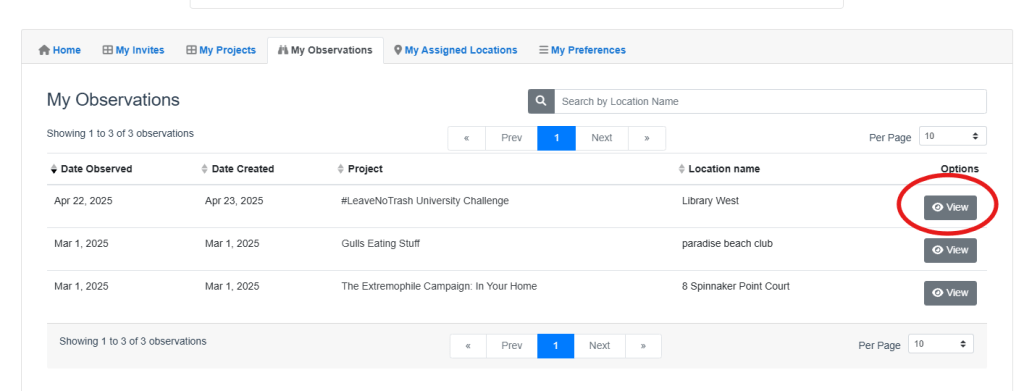
2. Click on the “My Observations” tab

3. Find your submitted observations, then click “View”
4. Click “Add Photos”
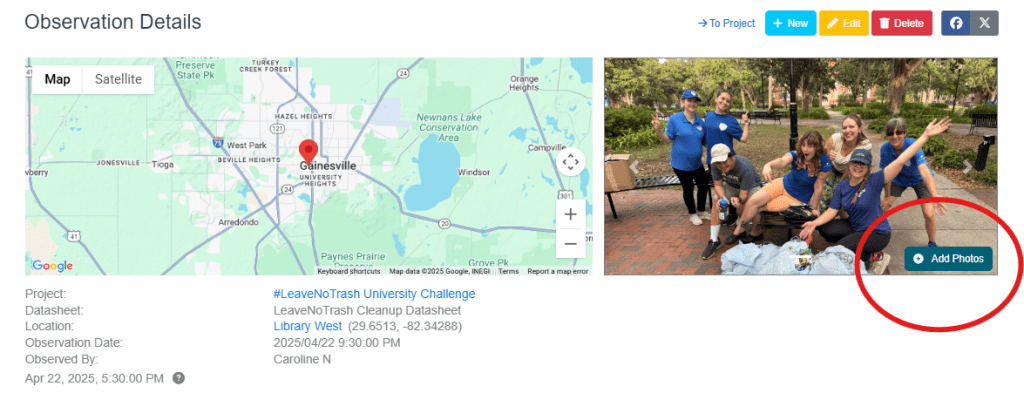
5. Add any missing photos that you wanted to submit originally.
By editing your observations, you’ll help make sure your data is complete and useful for project leaders and researchers.
Need help?
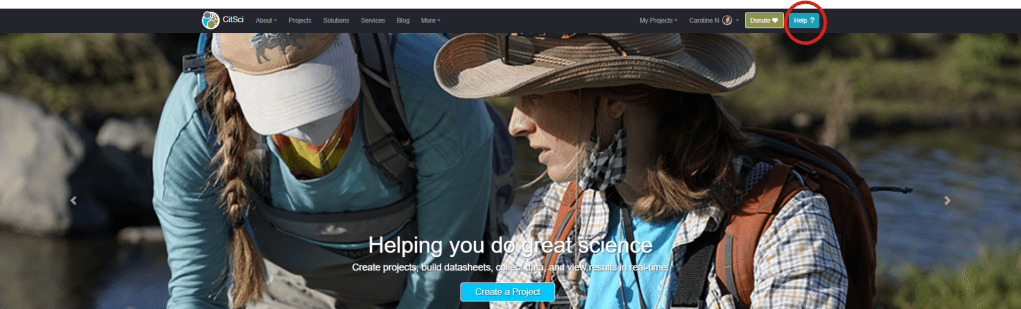
If you run into any issues, click the “help” button on the upper right hand corner of our website. We’re here to support you!
Thank you for your contributions to citizen science — and for taking a moment to update your observations!
The CitSci Team

 CitSci.org Blog